What is Expand?
The Expand system aims to provide a complete computing environment for people
with physical disabilities. Typical computing environments require
precice movement of hand muscles to use mice and keyboards. For people with
limited muscle control, using a computer can be difficult or impossible.
Expand solves this Human Computer Interface (HCI) issue through a single
button interface combined with a customised graphical desktop system.
It provides a practical and easy to use interface to emulate typical mouse and
keyboard style input.
In addition to the input system, Expand includes software and hardware to allow
control of a persons local environment through Infra Red and switch outputs.
This gives the ability to control external devices such as lights,
entertainment equipment and assistance buttons.
The main advantage of Expand over existing systems is its inexpensive,
Open nature.
All software is released under the
GNU General Public Licence which
``guarantees your freedom to share and change
free software'' — all software is available at no charge. A side-affect of
this licence is access to a massive amount of free software already available
through the Debian and
Ubuntu projects.
All hardware used in the system has also been designed to be inexpensive to
obtain or construct, right down to the base computer which runs the system.
Our prototype was built on a second-hand desktop PC obtained for AU$50.
There are four parts to the Expandy system:
- Uno: Gnome applet for displaying on-screen controls and generating low level
mouse and keyboard events.
- IR controller: c library and Unix commands for controlling infra red devices.
- Electronic interface design details: schematic diagrams and details for
building simple single button interfaces and an infra red controller.
- Icon Commands (IC): Gnome program allowing configurable commands to be
generated when an icon is clicked.
Uno
Uno is the central part of this system, as it captures button click events and
interacts with the underlying X window system to emulate mouse and keyboard
events. Uno operates as a Gnome panel applet which presents a user with initial
event type selection. Choosing a mouse event causes two of "cross-hairs"
to scroll across the screen which are used to choose a point where the
mouse even to be generated. Choosing a keyboard event presents a configurable
on-screen keyboard which cycles through buttons allowing one to be "pressed".
Uno obtains the button press through the linux input subsystem
(ie. /dev/input/event*)
which allows use of almost any input devices such as USB mice, PS/2 keyboards
and joysticks. For development, we modified a PS/2 mouse for connection to a
button or a blowtube.
Parallel Port Infra Red Controler
The infra red (IR) controller consists of a library for access to a simple
parallel port based transceiver and Unix commands to send and receive IR
data. The electronic transceiver uses readily available inexpensive components
(less than AUD$20) and is accessed through Unix commands to record IR signals
and re-transmit them.
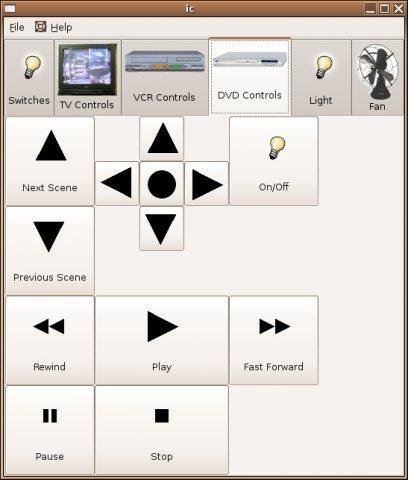
IC
Icon Commands presents a user with a window onto which graphical icons may be
placed. Pressing one of these buttons causes a Unix command to be executed.
This was intended to be used in conjunction with Uno and the IR controller for
sending signals to devices within a users physical environment (such
as an air conditioner, TV, etc.), emulating a physical remote control.
It may also be used to initiate applications on
the computer such as web browsers, email programs and VoIP telephone
applications. Combining all functionality into this single application provides
a unified method of access to common functions.
Development Status
The Expand system is currently in a "beta" state of development. If you would
like to help test and provide feedback on the expand system so far, please do
so with the knowledge that there may be unexpected issues.
A complete
Ubuntu based install CD is available from
the download page. If you already have a
Linux distribution,
you can obtain the Source code or
pre-compiled debian packages
News
2006-02-10 — Office of Science and Innovation Project Finished
A large proportion of Funding has been supplied for the Expand project
by The West Australian government's
Office of Science and Innovation.
Curtin University Department of computing
graduates Steven Webb and Wilson Waters have successfuly obtained grants in
2004 and 2005 through the
Studentship award.
The original concept for Expand was devised by Brett McLoughlin of
Health Technology Consultancy Services Australia.
HTCSA have supported this project through supply of resources and workspace within
their offices.
The period of activity for this grant has now come to an end and we are on the
lookout for new developers. If you are interested on assisting in any way,
please contact us.
2006-02-09 — Complete Expand install CD released
We have hit the main milestone of this phase of Expandy!
A complete install CD image is available from http://www.aui.computing.edu.au/projects/Expand/expand-1.0.iso"
This install CD is based on Ubuntu 5.10 breezy and contains all Expandy packages with a customised Gnome desktop.
As this is a complete operating system, insallation will overwrite any previous operating systems, such as Microsoft Windows, so be careful. Ask in the help forum (http://sourceforge.net/forum/forum.php?forum_id=517900) for assistance. If you already use a Linux system, individual packages are available from http://sourceforge.net/project/showfiles.php?group_id=154611
The minimum requirements for the Expandy install are:
PII 400MHz processor or better
128MB RAM
4GB hard drive space
PS/2 or USB mouse port.
It may run on lower spec hardware, though performance will be noticeably degraded.
2006-01-25 — Icon Commands (IC) V0.2 released
The latest update to the Icon Commands (IC) application is now available! Go to sourceforge.
The main changes involve the addition of configuration dialogs allowing simple modification to the on-screen icons without editing XML files.
Another major feature is the ability to record Infra Red signals. This information is saved to XML configuration files and may be used to control devices in the users environment.
2006-01-12 — Debian packages released
Debian packages for all expand projects are now available through: sourceforge
There is also a debian apt repository available through http://www.aui.computing.edu.au. To use this, add the following two lines to your /etc/apt/sources.list :
deb http://www.aui.computing.edu.au/projects/Expand/debian binary/
deb-src http://www.aui.computing.edu.au/projects/Expand/debian source/
then update apt using:
apt-get update
Install various programs (such as uno) using:
apt-get install uno
2006-01-12 — Uno V0.5 released
The latest version of uno has been released!
This release is suitable for general usage.
It includes a graphical configuration dialog for changing settings, such as pointer speeds, as well as numerous bugfixes and modifications.
It is available for download from: sourceforge
2006-01-05 — Uno development
We are almost at a stage to release Uno V0.2.
The changes so far involve addition of configuration dialogs for:
- Pointer settings
- Keyboard settings
- Input device capture and help
- Applet box settings
We have also cleaned up a lot of code, fixed a number of bugs and performed plenty of other behind-the-scenes jobs.
This version will be released soon via sourceforge and debian apt repository. In the meantime you may obtain the latest version from CVS (details at http://sourceforge.net/cvs/?group_id=154611).
-Wilson Waters
2005-12-13 — Expandy Initial Release
|